EnduraDocs Manager
Roles: Editor, Reviewer, Admin Plans: Starter, Pro, Advanced, Enterprise
- About the EnduraDocs Manager's functions and role in the EnduraDocs Software.
- About the organizational units of the EnduraDocs Manager.
- About methods of access control to your documentation files.
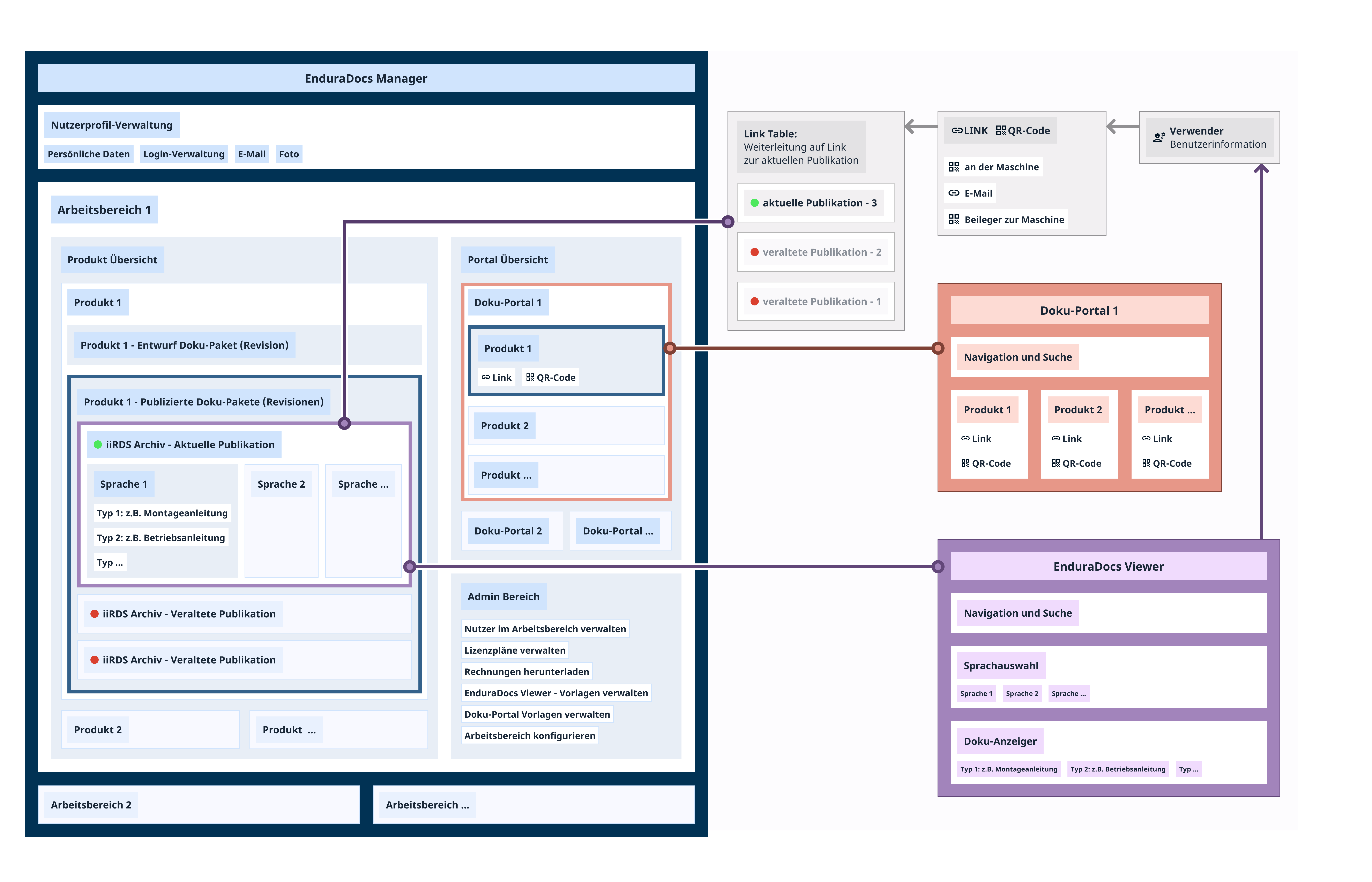
The EnduraDocs Manager is at the center of the EnduraDocs Software. Here, you manage your uploaded documentation files, users, settings, and sharing options. The functional areas of the EnduraDocs Manager include the Product Explorer, where you manage products that represent real-life devices from your portfolio, the workspace settings, and the Portal Explorer, if your payment plan includes Documentation Portals. Additionally, the EnduraDocs Manager implements a review process and access control that gives you complete control over which documentation files can be accessed by the operating personnel.
The topmost functional area of the EnduraDocs Manager you are taken to when you sign in is the workspace explorer. Here, you find your workspace, which represents your company. It contains the product explorer, the admin panel, and the portal explorer if your payment plan is Pro or higher.
The lowest functional area in the product explorer is the product page. Products represent a device from your portfolio. In the EnduraDocs Manager, you have one product page per product that contains the product settings and revisions. Revisions implement the categorization and basic version control in the EnduraDocs Manager.
Documentation files from published revisions are entered into the link table of the EnduraDocs Software. This means you can share the documentation files via link or QR-Code with the operating personnel. When they open a link or scan a QR-Code, the operating personnel do not access the EnduraDocs Manager but the Documentation Portal or EnduraDocs Viewer. These are web applications running in their browser. This separation between the EnduraDocs Manager as document manager and the Documentation Portal and EnduraDocs Viewer as delivery system provides you with complete control over your documentation files and access to them.